
 Global TechHub
Home
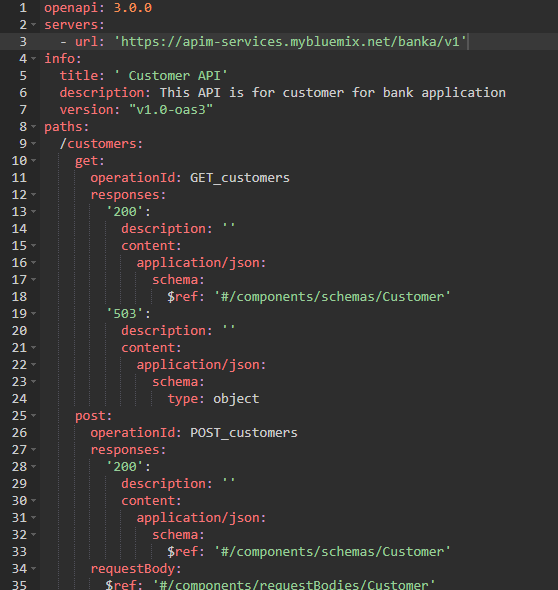
Introduction OpenAPI Specification (formerly Swagger Specification) is an API description format for REST APIs. An OpenAPI file allows you to describe your entire API, including: v Available endpoints (/users) and operations on each endpoint (GET /users, POST /users) v Operation parameters Input and output for each operation v Authentication methods v Contact information, license, terms of use and other information. API specifications can be written in YAML or JSON. The format is easy to learn and readable to both humans and machines. In this article, I am going to explain basic Structure of OpenAPI Specification. Overview You can write OpenAPI definitions in YAML or JSON. In this guide, we use only YAML examples but JSON works equally well. All keyword names are case-sensitive. A sample OpenAPI 3.0 definition written in YAML looks like: Metadata Every OpenAPI specification starts with the openapi keyword mentioning the version of t...

Introduction In this article, I am going to expain the deployment of Swagger Editor in Apache Tomcat server. After deployment we can access the Swagger Editor directly from server instead of opening html file to access Swagger Editor. Overview Step 1: First we need to Download Apache Tomcat server and extract it. Step 2: Download Swagger Editor and extract it. Step 3: Copy the extracted folder into <Tomcat Server>/webapps and rename the dist folder to swagger-editor. Step 4: Start the apache server. Step 5: Open http://localhost:8080/swagger-editor/ in browser. By default it will load with petstore sample as swagger provided as default sample. Conclusion We have successfully deployed Swagger Editor in Apache tomcat and able to access swagger editor from server.

Introduction In this article, I am going to explain the deployment of Swagger UI in Apache Tomcat server. After deployment we can access the Swagger UI directly from server instead of opening html file to access Swagger UI. Overview Step 1: First we need to Download Apache Tomcat server and extract it. Step 2: Download Swagger UI and extract it. Step 3: From extracted files copy the dist folder into <Tomcat Server>/webapps and rename the dist folder to swagger-ui. Step 4: Start the Apache server. Step 5: Open http://localhost:8080/swagger-ui in browser. By default it will load with petstore sample as swagger provided as default sample. Conclusion We have successfully deployed Swagger UI in Apache tomcat and able to access swagger ui from server. I am going to show how to deploy swagger editor in Apache tomcat server in my next article.

Introduction Spring Boot makes developing RESTful services ridiculously easy and using Swagger makes documenting your RESTful services easy. Building a back-end API layer introduces a whole new area of challenges that goes beyond implementing just endpoints. You now have clients which will now be using your API. Your clients will need to know how to interact with your API. API documentation should be structured so that it’s informative, succinct, and easy to read. But best practices on, how you document your API, its structure, what to include and what not to is altogether a different subject that I won’t be covering here. This article describe how to integrate Spring Boot Rest API with Swagger and will show the documentation and implementation. Overview In this article I am using existing Spring Boot Rest API sample. Please follow my previous article to build Spring Boot Rest API . I am just going to integrate with Swagger by using existing Spring Boot API. We need to f...